
Windows
Read System type in Settings → System → About. x64, ARM64 and x86 are separate builds.
- x64: MSI · Portable ZIP
- arm64: MSI · Portable ZIP
- x86: MSI · Portable ZIP
FREE PHOTOCRAFT · EFFECTCRAFT GUIDES
Find official EffectCraft downloads for Windows, Mac and Linux. Check AE project and plugin limits and follow a verified native animation sample.
EffectCraft is ArtCraft’s free, open-source motion graphics and compositing tool, written in Rust and targeting a familiar After Effects-style workflow. Start with titles, shape animation and layered compositions. Upstream also documents expressions, effects, 3D cameras and lights; we have not validated their full behavior.
The v0.9.2 README labels it alpha and says it is not yet a replacement for After Effects on client work. This is an independent guide website hosting only PhotoCraft, not an EffectCraft online editor or an official Adobe or ArtCraft service.
These v0.9.2 assets were checked October 13, 2026 and are not guaranteed to remain the latest. Match the target computer’s system and architecture before downloading. Files come from upstream; we do not repackage them.
Read System type in Settings → System → About. x64, ARM64 and x86 are separate builds.
Universal DMG serves Apple Silicon and Intel; the separate CLI ZIP is a terminal tool.
Run uname -m to check architecture. Mark AppImage executable before running; choose other formats for your distribution.
Check the official latest release · SHA256SUMS.txt · Official product page
Choose a standalone package for only EffectCraft, or examine the official Launcher to manage several Craft apps. Launcher releases and hashes are separate. Web ZIP is for hosting a website and Source code ZIP is for compilation; neither is a desktop installer. Official Launcher releases
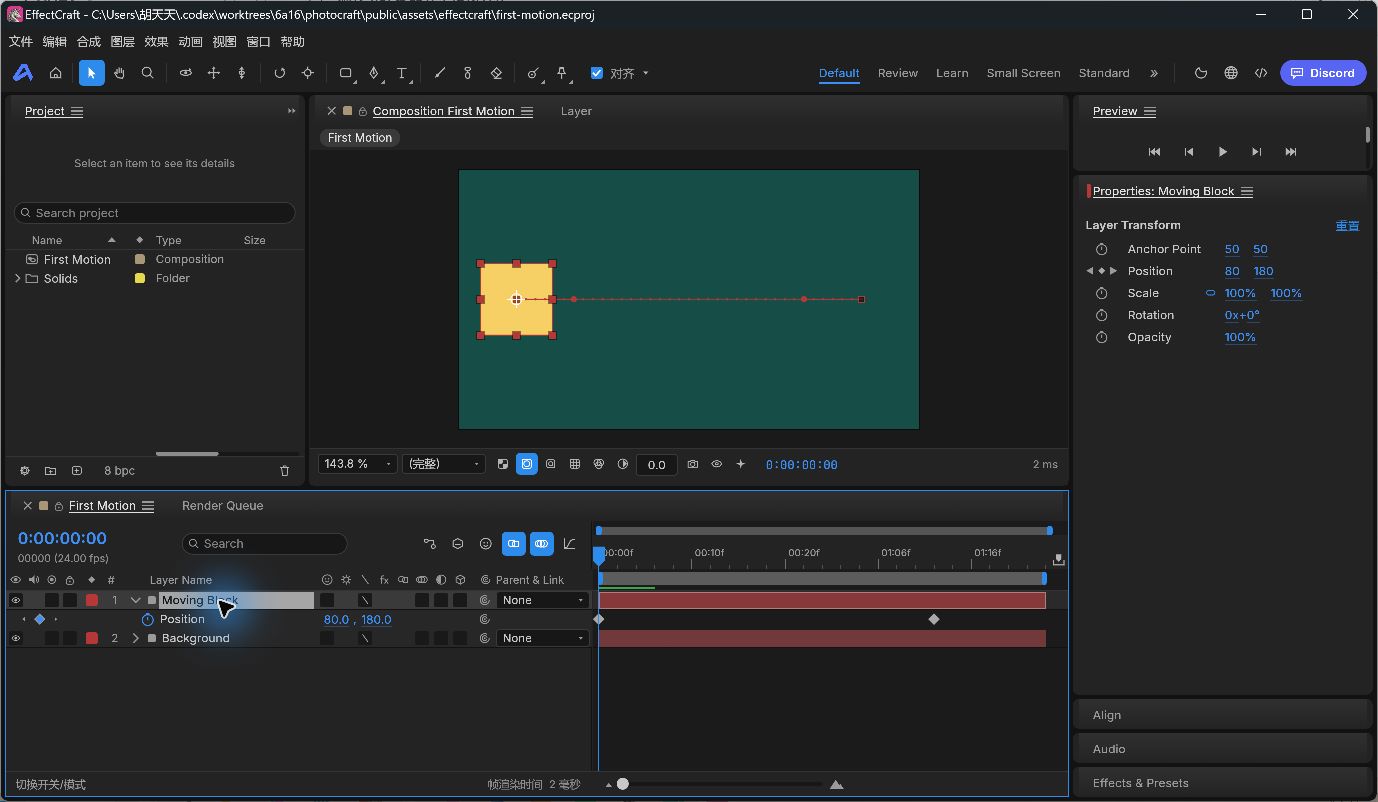
On October 13, 2026 we verified opening, editing position keys, Save As, reopening and GIF export through the render queue in the Windows 11 x64 portable desktop app, and retested its CPU CLI. MSI, Mac/Linux installation and Launcher remain untested. For graphics-device or startup failures, record system, GPU, version and the complete message, then examine upstream Issues. Verify files against the same release’s checksum list; a matching hash does not guarantee every environment runs them.
Start with our original native project: 640 × 360 at 24 fps, two solid layers and no external fonts or media. Change the position at 1.5 seconds from [560,180] to [500,180], save a copy, reopen it, then export a GIF through the render queue.
Open the illustrated desktop tutorial Use the CLI tutorial
Checked v0.9.2 documentation on October 13, 2026 and tested our original two-second animation. We did not run same-machine AE performance or image comparisons; this table establishes neither speed rankings nor full compatibility.
Scroll horizontally, or focus this table and use the arrow keys.
| Your requirement | EffectCraft v0.9.2 | After Effects | Decision or check |
|---|---|---|---|
| Release and purpose | v0.9.2 remains alpha; evaluate an original small task first. | Adobe provides motion graphics, compositing and animation tools. | Finish your smallest real task before deciding to migrate. |
| Existing projects | .ecproj; upstream says .aep/.aepx cannot be read. | Existing AE projects depend on their native structure. | Keep the AE originals; renaming an extension is not conversion. |
| Templates and presets | Native .ecpreset/.ectemplate, not AE .ffx/.mogrt. | AE templates and presets follow Adobe workflows. | Rebuild one native sample and check its media and effects. |
| Third-party plugins | AE plugins cannot run. | Projects may require specific plugins and licenses. | Keep the AE workflow for dependencies such as Trapcode or Element. |
| Layers and position keys | Our v0.9.2 desktop test covers two layers, two position keys and an endpoint edit. | Adobe documents layer-property and keyframe animation. | Try our exercise for a simple 2D task. |
| Save and reopen | Our desktop Save As/reopen test retains [500,180,0] at the endpoint. | AE projects preserve the working state. | Save a separate copy and reopen it to check persistence. |
| Export and delivery | We tested desktop GIF at 640 × 360, 24 fps, 48 frames; PNG separately through CLI. | Adobe documents render queue, output modules and Media Encoder workflows. | Test alpha, audio, MP4/ProRes and color on your own delivery sample. |
| Effects and expressions | Documented upstream; complex combinations and expression migration are untested here. | Adobe documents effects and expression workflows. | Rebuild a representative scene and inspect frames and parameters. |
| 3D compositing | Cameras, lights and 3D are documented, but untested here. | Adobe documents 3D layers and rendering. | Shared feature names do not establish model, material or output parity. |
| Text and Chinese typography | Text layers are documented; this exercise uses no fonts. | Adobe provides text and paragraph tools. | Check fonts, wrapping, alignment and final renders first. |
| Platforms and reliability | Mac, Windows and Linux packages; only Windows x64 was tested here. | Check Adobe’s current system requirements. | Match architecture, back up projects and test your own GPU environment. |
| Cost and licensing | Upstream uses MIT / Apache-2.0; check media and font licenses separately. | Subscription and trial terms depend on region and current plan. | Software licensing does not cover every template, font or plugin. |
For a simple layered animation without AE project or plugin dependencies, start with the desktop exercise. For client .aep revisions, paid templates, specific plugins or complex deliverables, retain the existing workflow and test a project copy requirement by requirement. Our two-layer GIF is not proof of professional replacement.
EffectCraft v0.9.2 README · Known gaps · Formats and interchange · Adobe animation basics · Adobe rendering and exporting · Adobe After Effects
storytold/effectcraft · Issues · MIT / Apache-2.0
The v0.9.2 Windows x64 portable ZIP downloaded October 13, 2026 matches both the GitHub asset digest and the release’s SHA256SUMS. We opened the desktop project, edited a position key, saved and reopened it, exported through the GIF render queue, and reran all six CLI tutorial commands. Output size, frame count and endpoint positions were checked separately.
SHA256 · Windows x64 ZIP: 1f6fbb3a348f1b12b15faa3bc2c78a079414f07454cc1402208793486e79bee4
Our old v0.8.0 Web test encountered graphics-device loss. That historical result does not describe v0.9.2. This update does not retest Web, MSI, Mac/Linux, fonts, audio, complex effects, 3D or every encoder. The official product page may lag behind GitHub; check release assets and checksums from the same version.
Do not assume so. Upstream v0.9.2 documents no .aep/.aepx, .mogrt/.ffx or AE plugin support. Our sample is native .ecproj.
No Rust installation is needed for official desktop binaries or their CLI. Compiling source is a separate task.
This site supplies guides and samples and still hosts only PhotoCraft. Upstream Web ZIP is for self-hosting.
We tested Ctrl+O to open and P for Position on Windows v0.9.2. Save As and Add to Render Queue were tested through menus, which display Ctrl+Shift+S and Ctrl+M. The tutorial includes mouse paths; other systems’ keys were not tested.